What is MCP and Why It Matters for Dynamics 365 Finance & Operations?
7/7/2026 • 8 min read
I've been spending time learning about Model Context Protocol (MCP) and how Microsoft is bringing it into Dynamics 365 Finance & Operations. To consolidate my understanding and hopefully help others getting started I created a simple two-page explainer.
MCP is quietly changing Dynamics 365 Finance & Operations from being primarily a system of record into a system of action, where AI agents can securely interact with ERP data and execute business processes.
Disclaimer
This article is a personal learning resource based on official Microsoft documentation. It reflects my current understanding and is intended for educational purposes.
What is Model Context Protocol (MCP)?
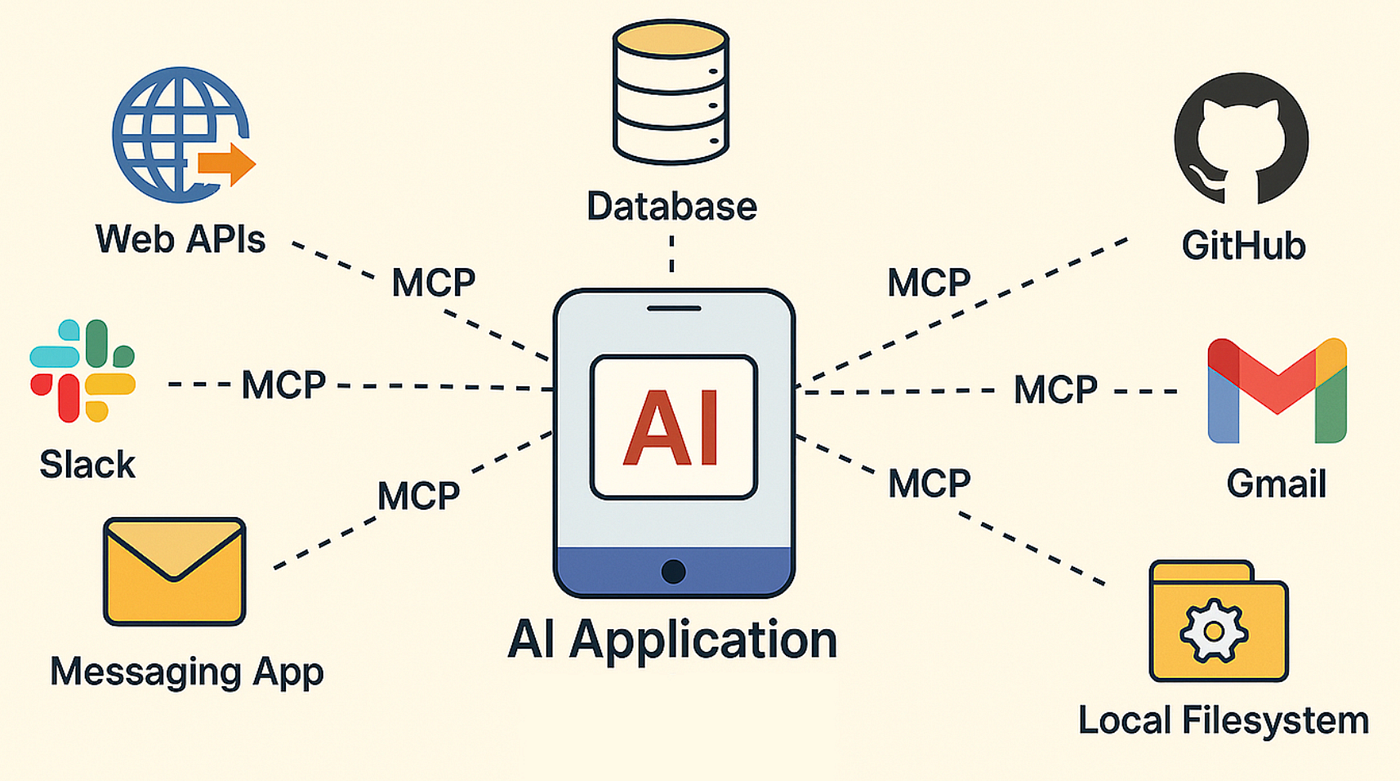
Model Context Protocol (MCP) is an open standard that allows AI applications and agents to securely connect with enterprise systems.
Instead of building custom integrations for every AI application, MCP provides a standardized interface that lets AI agents discover available capabilities and interact with business systems in a secure, governed way.
For Dynamics 365 Finance & Operations, this means AI agents can:
- Read ERP data
- Execute business actions
- Navigate forms
- Trigger workflows
- Work with data entities
all without requiring developers to build custom APIs for every scenario.
From a Static Server to a Dynamic Server
One of the biggest improvements is the evolution from the original 13-tool MCP server to the new Dynamic MCP Server.
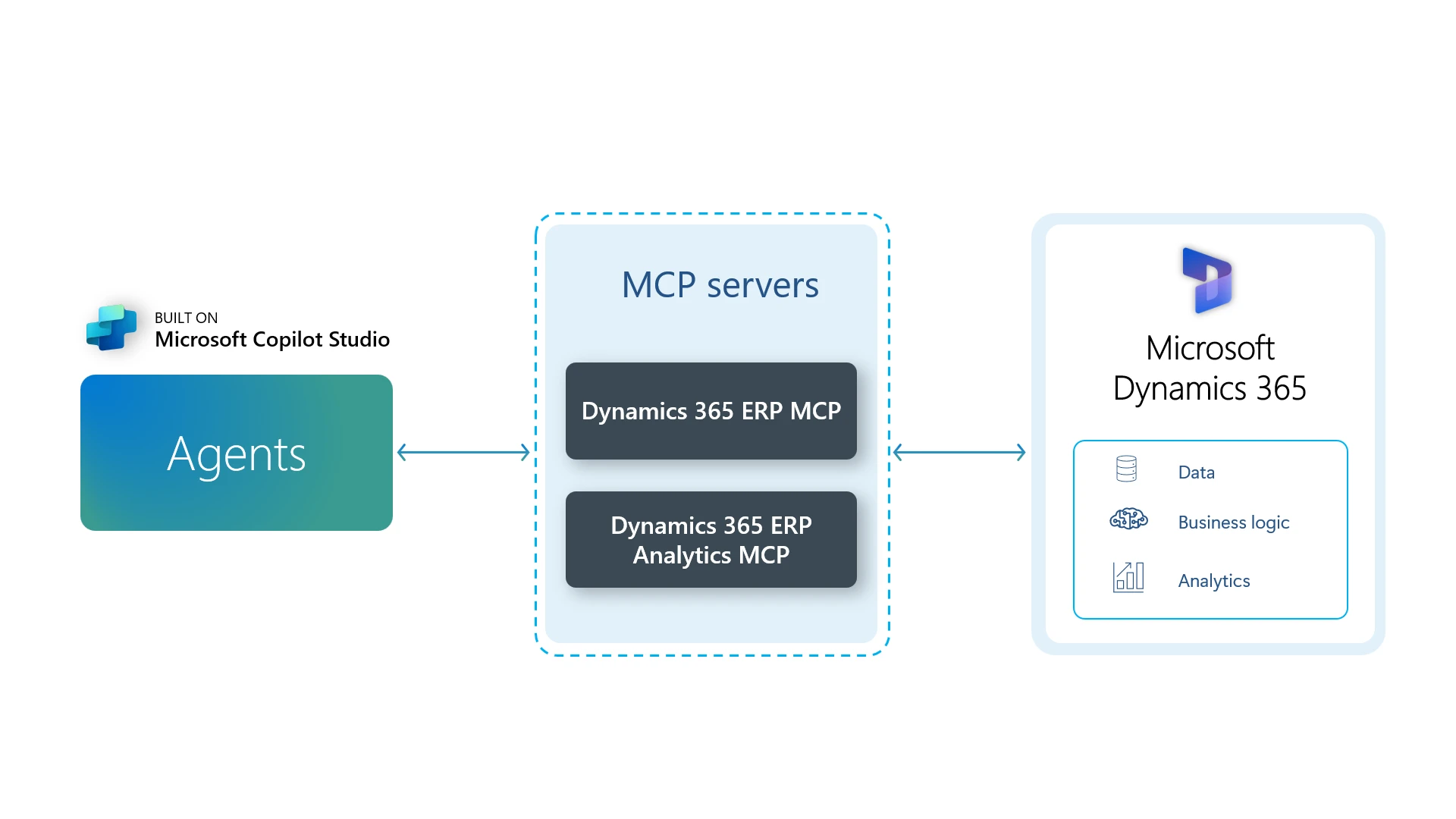
The Dynamic MCP Server became Generally Available (GA) in February 2026 and exposes more than 650,000 ERP actions directly from Dynamics 365 Finance & Operations.
Instead of manually defining a small set of tools, the server can dynamically expose business capabilities already available inside the ERP.
This dramatically expands what AI agents can accomplish.
How AI Agents Work
Rather than bypassing business logic, MCP-enabled agents interact with Dynamics 365 Finance & Operations much like a human user would.
Agents can work through:
- Forms
- Data Entities
- Business Actions
Because they're using the application's existing business logic, organizations can reuse the validations and processes they've already implemented.
Security and Governance
One of the strongest aspects of Microsoft's implementation is that governance is built in from the beginning.
AI agents inherit:
- Existing security roles
- User permissions
- Organizational access controls
- Audit logging
This means organizations don't need to redesign their security model simply to enable AI experiences.
Technical Setup
The second page of my explainer focuses on getting started technically.
Prerequisites
Before using MCP with Dynamics 365 Finance & Operations, you'll typically need:
- A supported Dynamics 365 Finance & Operations environment
- An enabled Dynamic MCP Server
- Microsoft Copilot Studio
- Appropriate licensing
- Required security permissions
Supported MCP Clients
The Dynamic MCP Server can be connected from supported MCP clients, allowing agents to securely access ERP capabilities.
One common approach is adding the MCP server to a Microsoft Copilot Studio agent, where the available ERP actions become tools the agent can use.
Model Selection and Licensing
When designing AI agents, it's also important to consider:
- Which AI model best fits the workload
- Licensing requirements
- Performance vs. cost
- Organizational governance policies
These decisions depend on your specific business scenario and deployment architecture.
Buy vs. Build
Not every organization needs to build AI agents from scratch.
Microsoft also provides options to discover pre-built solutions through:
- Microsoft Marketplace
- Microsoft AppSource
Depending on your requirements, adopting an existing solution may significantly reduce implementation time.
Why This Matters
ERP systems have traditionally been excellent systems of record, storing structured business data and enforcing business processes.
With MCP, they're becoming systems of action, where AI agents can securely understand context, perform business operations, and assist users without replacing existing governance.
This represents an important shift in how organizations will interact with enterprise software over the coming years.
Final Thoughts
I'm still learning about MCP and the broader ecosystem around agentic ERP, but it's one of the most interesting developments I've seen in the Dynamics 365 space.
If you're exploring AI agents for Dynamics 365 Finance & Operations, I'd love to hear:
- What use cases are you experimenting with?
- Are you building custom agents or using Microsoft-provided ones?
- What challenges have you encountered so far?
Learning in public has been one of the best ways for me to deepen my understanding, and I hope this summary is useful to others on the same journey.